Nifty Desk

Drop your broker screenshot. Get a live-priced NIFTY workbook.

Nifty Desk reads a screenshot of your net-position grid with on-device Windows OCR, prices it against the public NSE option chain, and writes an Excel book laid out exactly like a hand-made one β€” so you can see what your book is worth before the market tells you.

Free & open source (MIT) Β· Windows Β· no broker login Β· no API key Β· your screenshots never leave your machine

Everyone is telling you how to trade. Nobody is telling you how safe you are.

Nifty Desk does not place orders and does not promise returns. It makes the risk visible. That is the whole point.

How it works

Four steps, and the only one that touches the internet is the public NSE quote request.
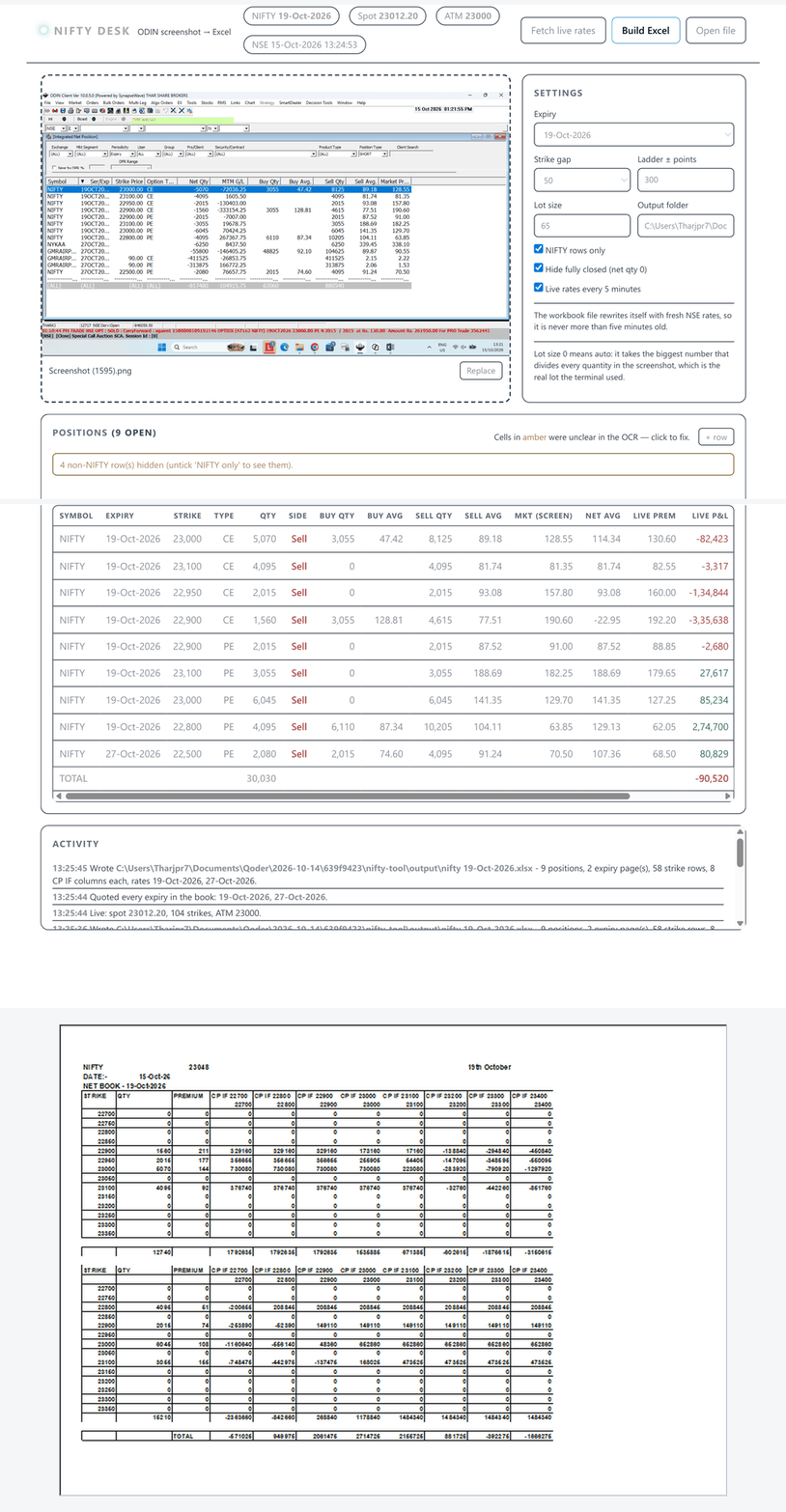
Nifty Desk flow: broker screenshot loaded, positions parsed, Excel workbook generated
Screenshot in β†’ positions parsed β†’ workbook out.
1Screenshot in

Drag & drop or Ctrl+V. Windows OCR reads the grid locally β€” the image never leaves your machine.

2Positions parsed

Non-NIFTY and fully-closed rows are filtered out; lot size is auto-detected from the quantities.

3Live rates

Spot and premiums come from the public NSE option chain. No API key. The book then refreshes itself every 5 minutes.

4Excel out

One Sheet1 block per expiry, each printing on its own page.
The sheet, not a dashboard

It deliberately outputs a spreadsheet rather than a pretty web chart, because the output is meant to be editable. The tool is not the source of truth β€” your book is.

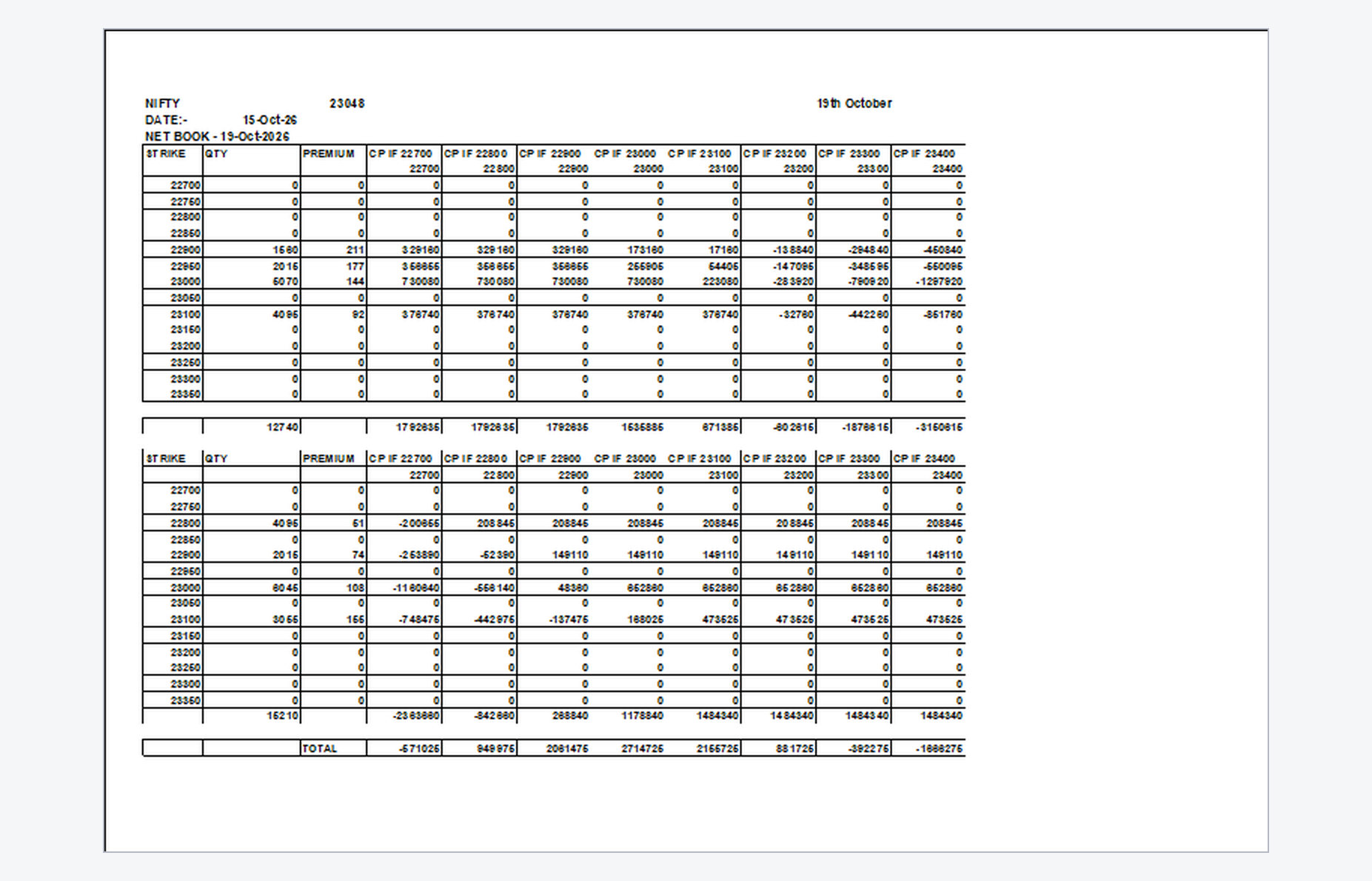
Generated Excel workbook showing CE and PE strike ladders, live CP IF scenario columns and the grand TOTAL row
Real generated output, opened in Excel.
  • Full STRIKE / QTY / PREMIUM ladder at a 50-point gap.
  • Zero rows included, so you can type into them by hand.
  • CE section, PE section, and a NIFTY futures line that is always there for you to type into (plus for long, minus for short), then a grand TOTAL.
  • CP IF <spot> scenario columns at a 100-point gap.
  • Every scenario cell is a live IF formula β€” edit a qty or rate and the whole grid recalculates.
  • Premiums are round whole numbers. A premium is not a decimal point.
  • Each expiry prints on its own page.

The sign convention that quietly breaks hand-made books

The terminal shows a short as a negative net quantity. The sheet flips that and keeps a Side column, because this is what makes the payoff formulas come out right.

SELL β†’ positive

A short quantity is written as a positive number.

BUY β†’ negative

A long quantity is written as a negative number.

Install

Windows 10 or 11, 64-bit. Nothing else is required.

Option 1 β€” the exe (recommended if you don't have Python)

  1. Download the NiftyDesk-win64-…​.zip asset from the latest release.
  2. Unzip it anywhere β€” Desktop is fine.
  3. Double-click NiftyDesk.exe. A console window opens and your browser follows a second later.
  4. Close the console window to stop.

Workbooks land in an output folder next to the exe; settings persist in config.json beside it. If the exe sits somewhere read-only, both move to %LOCALAPPDATA%\NiftyDesk.

First run: β€œWindows protected your PC”? That’s SmartScreen, not a virus. The exe is unsigned because code-signing certificates cost money. Click More info β†’ Run anyway. The full source is public, so you can also build it yourself with build_exe.bat.

Option 2 β€” from source

pip install -r requirements.txt
python server.py

Then open http://127.0.0.1:8765/. Or double-click Run Nifty Desk.bat.

Questions people actually ask

I dropped a screenshot and it read 0 rows. What now?

The Activity log tells you which of these happened β€” read that line first:

  • "none of them formed the ODIN position grid" β€” OCR read text but could not recognise the table. Usually the screenshot is cropped so the header row is missing. Capture the whole grid including its header line and try again.
  • "does not follow the standard ODIN column layout" β€” that broker's grid has its columns rearranged or some of them hidden. Only the columns its own header spells out are read, so Net Qty, Market Price and MTM still land in the right cells and nothing is guessed at. Show the rest in the terminal to bring the averages in too.
  • "no text at all" β€” the English OCR recogniser is not installed on that machine. Add English under Settings β†’ Time & Language β†’ Language, then retry.
  • "every row was filtered out" β€” the grid parsed fine, but your settings hid it. Untick NIFTY rows only or Hide fully closed.

If the log shows the raw text it read and it still looks wrong, send that screenshot β€” brokers ship different ODIN builds and each one gets the parser tuned to it.

Why isn't this a website I can just open?

Three hard reasons, and none of them are laziness:

  • OCR is local. The parsing uses Windows' built-in OCR. A server doesn't have it, and shipping your broker screenshot to someone else's machine is exactly what this tool refuses to do.
  • NSE blocks datacentre IPs. The public option-chain API works from a residential connection and rejects cloud hosts, so a server-side version would fail at the rate fetch.
  • The privacy promise. Nothing about your positions leaves your laptop except an anonymous public quote request. Hosting it would break that.

So: a local exe, and this page just explains it.

Does it need broker API credentials?

No. There is no broker login anywhere in it. Rates come from NSE's public option-chain endpoints, the same data any website visitor can see. Your positions only ever exist as a screenshot on your own disk.

What if OCR loses the CE/PE column on a row?

It happens on real screenshots. The tool recovers the type from the sibling leg at the same strike, and where there is no sibling it compares that row's market price against the live NSE CE and PE at that strike and takes the closer one. That fixed a whole class of "my PE leg vanished" books.

Why keep the zero rows? Looks messy.

Deliberate. You will want to type into the output β€” adjust a leg, add a strike you're thinking about. A locked, fully-generated report is prettier and less useful. The ladder is a worksheet, not a printout.

Does it work for stocks other than NIFTY, or on Mac?

The symbol is configurable in config.json, but the layout and lot-size handling are tuned for NIFTY. Mac and Linux are not supported β€” the OCR step calls a Windows-only API.

Will it place or square off orders?

No, and it never will. It reads a screenshot and writes a spreadsheet. That separation is on purpose.